
TLDR: AI prompts are instructions that guide chatbots to produce better, more accurate, and more creative results. The quality of your prompt is the quality of the output. Be specific, give context, define a role, set a tone, and state your goal clearly. Use iterative prompts and break tasks into steps. Whether you’re writing content or generating images, better prompting = better results.
At a Glance:
- Specificity wins. Context, tone, and goals help chatbots deliver stronger, more accurate responses.
- Break complex tasks into steps. Follow-up prompts dramatically improve output quality.
- Prompt engineering is now a core skill. Understanding how to write effective AI prompts boosts productivity across marketing, operations, and creative work.
- AI tools evolve fast, so your prompting skills should, too. Explore advanced prompting techniques and new tools.
AI chatbots are now a staple in our digital lives, offering quick and smart assistance across various platforms. They can provide instant information, write relatable marketing content, and even engage in human-like conversation.
To do this effectively, though, chatbots need strong AI prompts.
What are AI chatbot prompts, and how do you write the best prompts for AI chatbot? Let’s break it down.
What Are AI Chatbot Prompts?
If you’re new to AI prompting, it can seem intimidating. But the concept is simple.
A chatbot (ChatGPT, Gemini, Claude, Copilot) is a computer program that gathers human inputs like Internet searches, books, and published stories and uses that information to mimic human consciousness.
A prompt is simply a set of instructions you provide to a chatbot to elicit a natural, accurate, and effective response according to your task.
Prompts tell the AI who it is, what it’s doing, how you want it to sound, and what outcome matters most.
A rule of thumb: Weak prompts = weak output. Strong prompts = strong output.
Why Good Prompts Matter
AI tools have become truly multi-modal: text, images, audio, data analysis, research assistance, brainstorming, and more. Knowing how to write AI prompts, or even how to write an advanced AI prompt, is now a core digital skill.
A weak prompt produces generic, vague, or even biased answers. A strong prompt produces insight, clarity, and content you can actually use.
The difference? Specificity and structure. When you define the context, the goal, and the format you want, the AI stops guessing. Better prompts mean fewer revisions, faster workflows, and smarter output.
A Simple Formula for Strong Chatbot Prompts
You’ll never need a complicated “prompt hack.” Just follow this structure:
Role + Task + Details + Tone + Goal + Constraints (optional)
Here is an effective AI prompt example that includes all of the keys and is workable as a template for any task:
“You are a marketing director who excels at creating catchy, relatable content. You want to create a 100-word social media post about [insert business here]. Make it warm, catchy, and highly shareable. The goal is to drive referrals and increase local engagement. Include one playful CTA at the end.”
Below is a screenshot of what it looked like to provide this prompt to Microsoft’s CoPilot, which has five different conversation modes: Smart, Quick Response, Think Deeper, Study and Learn, and Search. I chose “Smart” for this to elicit the most imaginative response.
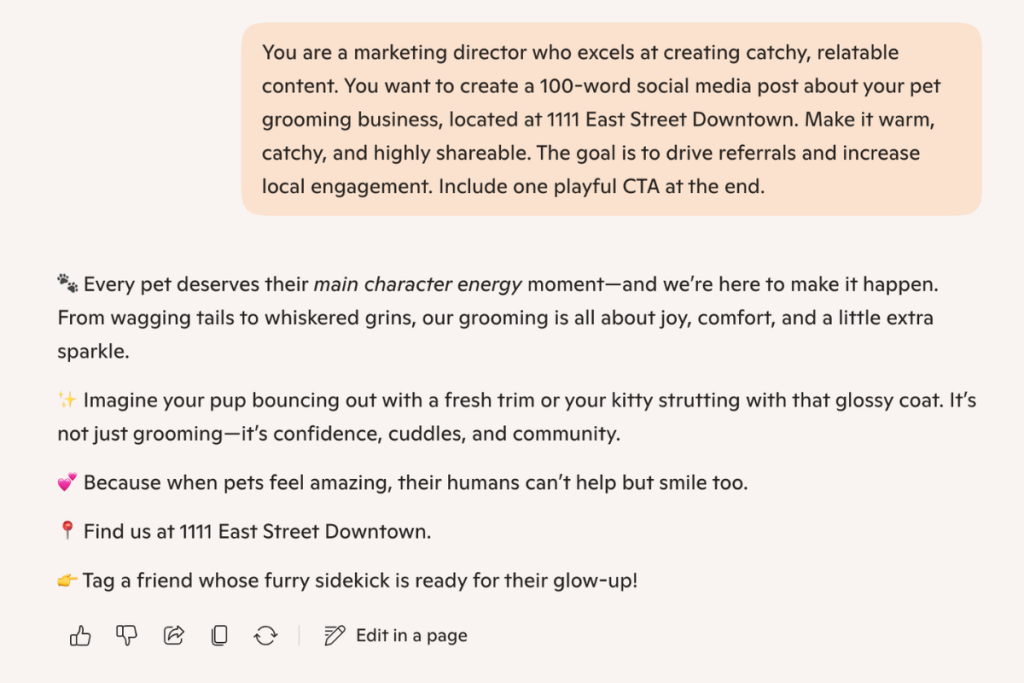
Why it works:
- It sets a role (marketing director).
- It describes the task (100-word post) and details (pet grooming business and address).
- It sets a tone (warm, catchy).
- It clarifies a goal (referrals + local engagement).
- It anchors output with constraints (100 words + playful CTA).
This is the foundation of how to write a chatbot prompt that actually delivers.
Prompting for Different Outputs
Modern chatbots are wildly versatile. You can now prompt them to create: social posts, long-form blogs, SEO meta descriptions, custom schedules, email sequences, images, data summaries, video scripts, customer service replies, learning plans, interview questions, slide decks, and much, much more.
But the key is the same: be specific.
To generate a different content format with the template, simply replace “social media post” with whatever you need. You can always be more explicit about each of the prompt elements if you want a specific style or level of detail.
Don’t be afraid to over-communicate with chatbots. If it takes an extra prompt to get the result you want, keep the conversation going. That is often how you get the best outputs.
For more complex tasks, it can help to break the request into smaller pieces so the chatbot addresses each part thoroughly.
For example, if you’re creating a daily work schedule, you might start by setting the foundation: “I work 9–5 p.m. I want you to create a schedule with three meetings at 10:00, 12:00, and 2:30.”

Then, you can use a follow-up prompt to provide additional context and details, such as a built-in lunch period between meetings two and three, a possible fourth meeting at 4:00, and individual time for research at 11:30.
Help the chatbot understand your goal and scenario. If you do that, you are more likely to get the desired result.

Crafting Effective AI Prompts
When learning how to write effective AI prompts, keep this in mind: use natural language, but be intentional.
Because chatbots are trained on human responses, talk to them the way you’d give clear, concise directions to a new coworker or intern. They’re still “learning the mechanics” of your task, so the more context and clarity you offer, the better the outcome.
Think through what that coworker would need to know:
- What’s the task?
- What tone should they use?
- What’s the goal?
- What constraints matter?
If you feel like you’re over-explaining, you’re probably doing it right. AI thrives on specifics. If you’re not sure what else to include, try explaining the background: why you need the output, how you’ve handled it before, or what’s worked or failed in the past.
Even that history helps the AI understand the full picture.
You’ll start to spot the difference between strong and weak prompts quickly. A weak prompt might be: “Write a social media post for my pet grooming business.” Sure, you’ll get something back, but it won’t be tailored or strategic.
And remember: great prompting is often a back-and-forth process. Just like coaching a new intern, you refine the output with follow-up questions until it’s exactly what you need. Keep talking to the bot; that conversation is the workflow.
More Advanced Prompt Techniques
AI prompting can be nuanced, and modern tools like ChatGPT, Gemini, Jasper, and Claude are always releasing new versions that are more sophisticated. Increasingly, you can shape the model’s reasoning, not just its output.
Here’s where AI prompt techniques get interesting:
- Chain-of-thought prompting: Ask the model to think through the steps behind its answer. This boosts accuracy for strategy, logic, and planning.
- Persona prompting: Define a role with expertise: copywriter, UX strategist, CFO, HR director, PR specialist. You’ll get more specialized responses.
- Style prompting: Tell it to write in the style of your brand, a publication, or a personality. This builds brand voice consistency.
- Constraint-forward prompting: Use short word limits, specific structures, must-include bullets, or formatting rules.
- Customize Your AI Settings: Tools like ChatGPT let you set Custom Instructions (Settings → Personalization → Custom Instructions), which act as your always-on prompt. For example, mine is set to: “Be innovative and think outside the box. Tell it like it is; don’t sugar-coat responses. Take a strategic and analytic approach.” This baseline boosts the quality of every single output because the model already understands how to think, write, and reason for you.
Play around with these once styles you nail down the basics.
Ethical Considerations in Prompting
AI is trained on human inputs, so misinformation is also a concern. Make sure you cross reference any information given by the chatbot to ensure accuracy.
And because AI learns from users’ responses, your data could be reviewed by humans at the chatbot’s parent company (like Google and Microsoft). Do not give out personal information or passwords to a chatbot.
Although it might feel like you are talking to a robot, it is important to remember that there are human employees on the other end who may review your AI prompts to better train their systems.
Ready, Set, Prompt!
Good AI chatbot prompts can save hours and seriously elevate your work.
So, which platform should you use? Each chatbot has its strengths. Here are a couple you could start with:
- ChatGPT is usually quick to respond and is effective at providing natural-sounding outputs.
- Microsoft’s CoPilot is great for schedule planning and fact-checking.
- Google’s Gemini is trained on Google data, meaning it is diverse and multifaceted.
No matter which one you choose, implementing these prompting tips will make the process more efficient and effective.
If you want deeper support in mastering how to write prompts for AI, Proof Digital has you covered.
Download our free resource on AI prompting, or talk to our team about how we’re helping businesses grow using strategic, practical AI.
FAQs
What is prompt engineering in AI?
It’s the process of designing clear, structured prompts to guide AI systems toward accurate or creative outputs.
Is writing good AI prompts really that important?
Yes. Your prompt is the biggest factor in the quality of the result…more than the model itself, in many cases.
What makes a prompt “advanced”?
Advanced prompts use roles, constraints, tone, multiple steps, or reasoning processes. They produce more tailored and reliable output.
How do I write better chatbot prompts?
Use the role-task-tone-goal method, then add clarity. More context = better output.
How to prompt ai to create an image?
When you’re creating visuals instead of text, your prompt needs a different kind of detail. Image prompts rely on descriptive, sensory, and stylistic cues. Think lighting, composition, mood, textures, and specific subject details.
What’s the best way to start using AI tools for marketing?
Start with one tool that solves your biggest need—SEO, content creation, design, or reporting—and integrate it into your workflow. Scale from there.
What are the biggest risks of AI for businesses?
Primary risks include data exposure, compliance issues, unauthorized access, inaccurate outputs, and phishing attempts using AI-generated content.
What information should I avoid entering into AI tools?
Avoid entering passwords, personal data, client details, financial information, legal documents, or anything sensitive or confidential.
How do we build an AI safety policy?
Define approved tools, outline data boundaries, set security standards, clarify employee usage expectations, and review the policy regularly.
Related Links
- Warning! Google Gemini AI Chatbot Has Security Risks
- 6 Free AI Tools for Marketing
- How to Be the Best Answer in AI Search
- AI in the Workplace: Unlocking Potential with Responsibility
- Everything You Need To Know About Search GPT
- Generative Engine Optimization (GEO): What You Need to Know
- AI in Digital Marketing
- Free AI Downloadable
- Google Gemini Warning: Don’t Share Confidential Information
- AI – Latest Insights, Applications, and Tools We Use
- Resource Hub
- Our Work
- Let’s Talk