TLDR: Bots now generate more than half of all web requests, and AI crawlers are responsible for a fast-growing share of them. They cost you hosting resources, but blocking them all can also erase you from AI search. The best approach for 2026 is to sort bots into groups, not treat them all the same.
At a Glance:
- Today, automated traffic outnumbers human traffic on the web, and AI crawlers make up a growing portion of it.
- AI crawlers consume server resources, which often shows up as throttling, slow pages, or upgrade prompts.
- Training crawlers mostly take content and return nothing, while answering bots can send referral traffic back to your site.
- Publishers increasingly allow specific AI bots on purpose, making bot management a sorting decision.
As of June 2026, 57% of website requests came from automated traffic, not people. A growing share of that traffic? AI crawlers.
They read your site, use the hosting resources you pay for, and often send nothing back.
The instinct is to block them all. That move isn’t right because some of those bots are why your business shows up in AI answers at all.
This guide shows you how to see who’s crawling your site, how to tell the takers from the referrers, and what to do about each group. For wider security foundations, explore our podcast episode all about protecting your online presence.
It’s Cybersecurity Awareness Month, and the National Cybersecurity Alliance’s 2026 theme says it best: “Don’t Make It Easy for Them.” Right now, plenty of bots have it pretty easy on your website. Let’s change that.
More Than Half of Your Website Traffic Isn’t Human
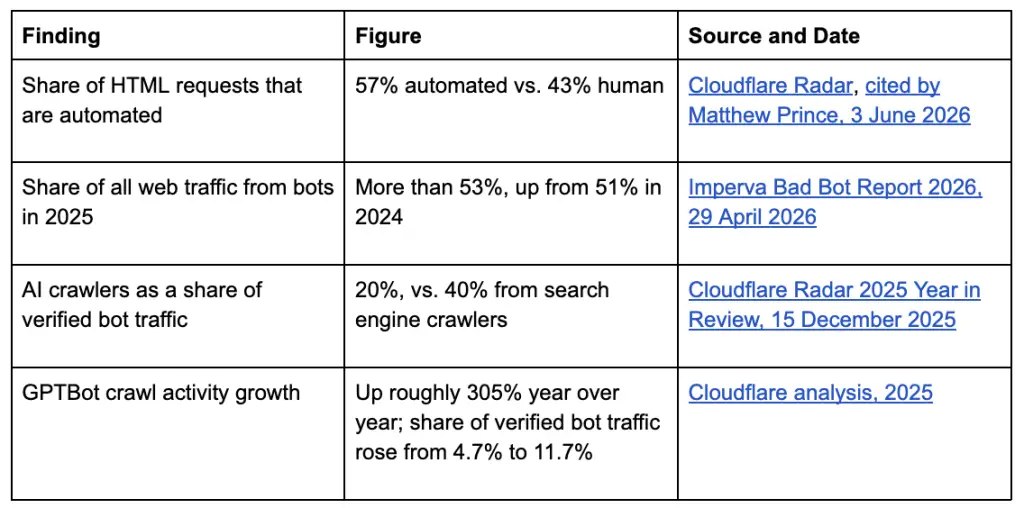
Most web traffic no longer comes from humans. In June 2026, Cloudflare CEO Matthew Prince announced that bots had overtaken human traffic online for the first time, with Cloudflare Radar data putting automated HTML requests at about 57%, against about 43% from humans.
Imperva’s Bad 2026 Bot Report reaches a similar conclusion: bots generated 53% of all web traffic in 2025, up from 51% in 2024. Imperva measures a more extensive basket of traffic than Cloudflare, so it’s important to compare the two figures side by side.
AI crawlers drive much of this growth. Here’s what the data shows:
None of this happens in the abstract. Every one of those requests hits a real server, and for most small and midsize businesses, that server runs on a hosting plan they pay for each month.
And crawlers don’t visit once. They return on their own schedules, whether or not anything on the page has changed, and every return trip is another request your server has to answer.
What AI Crawlers Actually Cost You
AI crawlers cost you hosting resources, and how you feel the cost varies with your hosting plan.
Bandwidth-metered plans take the biggest hit, because every bot request counts against your monthly allowance. Shared hosting usually hits a different wall first: CPU, process, or I/O limits.
On shared plans, the symptoms include slow pages, throttling, or an alert to upgrade. You won’t see a line item for bot overages, but you will see a site struggling more than your visitor numbers can explain.
When digital agency Search Influence reviewed a week of its own server logs in April 2026, it found its host, WP Engine, rate-limiting 51% of Amazonbot requests, 29% of ClaudeBot requests, and 29% of GPTBot requests.
At least one major host also stopped billing customers for bandwidth used by unwanted bots, a sign that the hosting industry now openly acknowledges bot load is real and significant.
Signs bots may be eating your hosting resources:
- Your site slows down at odd hours, when your customers are not typically active.
- Your host sends resource-limit warnings or upgrade nudges with no matching rise in leads or sales.
- Server load climbs while human traffic in your analytics stays flat.
- Bandwidth use grows faster than your visitor count.
Here’s a practical rule of thumb: if bots account for a third or more of your bandwidth, your hosting plan is priced for traffic your customers don’t generate.
Performance problems also ripple into search. Slow, strained sites tend to rank worse, a connection we explore in our guide to website security and higher SEO rankings.
Why Blocking All Bots Is the Wrong Answer
Training bots and answering bots do different jobs, and they deserve different treatment. Blanket-blocking means eliminating the bots that help you to stop the bots that don’t.
Training crawlers collect web content to train AI models. They ingest your pages and mostly return nothing to your site.
Answering bots (also called retrieval or AI search bots) fetch pages to cite in live AI responses. When an AI tool cites your page, those citations drive referral traffic.
The crawl-to-referral ratio shows this gap, measuring how many pages a platform crawls for every visitor it sends back to the site.
- Google: about 4.9 pages crawled per referral
- OpenAI: about 309 pages crawled per referral
- Anthropic: about 988 pages crawled per referral
- Perplexity: about 1,083 pages crawled per referral
Source: TechnologyChecker.io analysis of Cloudflare Radar data, Q3 2026
The purpose behind AI crawling has started to change, too. Training’s share of AI crawl traffic fell from 49.93% in Q2 2026 to 47.62% in Q3. Search and user-action crawling nearly doubled over the same time period, rising from 6.51% to 11.92%.
One finding reframes the whole conversation. Cloudflare analyzed 4,242 robots.txt files across its network in a September 28, 2026 snapshot, with the big change since 2025 being more explicit allowing rather than blocking.
GPTBot’s allow share rose from 2.51% to 7.69% in a year, roughly tripling. Over the same stretch, its block-to-allow ratio fell from 3.72:1 to 1.60:1. Full disallows remain low as 8.11% of files block GPTBot, 6.91% block ClaudeBot, and 5.94% block Google-Extended.
Publishers stopped treating AI bots as all-or-nothing and started sorting them.
That leaves every business owner with the same question: which AI crawlers do I allow? Almost nobody has made that decision on purpose.
How to See What’s Crawling Your Site (Free)
You can see exactly which bots visit your site for free. Three free sources cover most businesses:
- Server logs or your host’s bot analytics: Raw logs record every request and its user agent, and many hosts summarize bot activity in their dashboards.
- Cloudflare AI Crawl Control: Sites on Cloudflare can see AI crawler activity by bot and set per-bot rules.
- Free GEO monitoring tools: First-party tools show how often AI platforms cite you, which completes the picture.
We walked through these in our roundup of the best free AI search and GEO monitoring tools. Start there for setup details.
What to look for once you have the data:
- Which AI user agents visit your site.
- How often each one returns.
- Which pages they request most.
- Whether crawl volume bears any relationship to the referral traffic you actually receive from that platform.
That last question matters most. A bot that crawls thousands of pages and sends zero visitors tells a very different story than one that sends steady referrals.
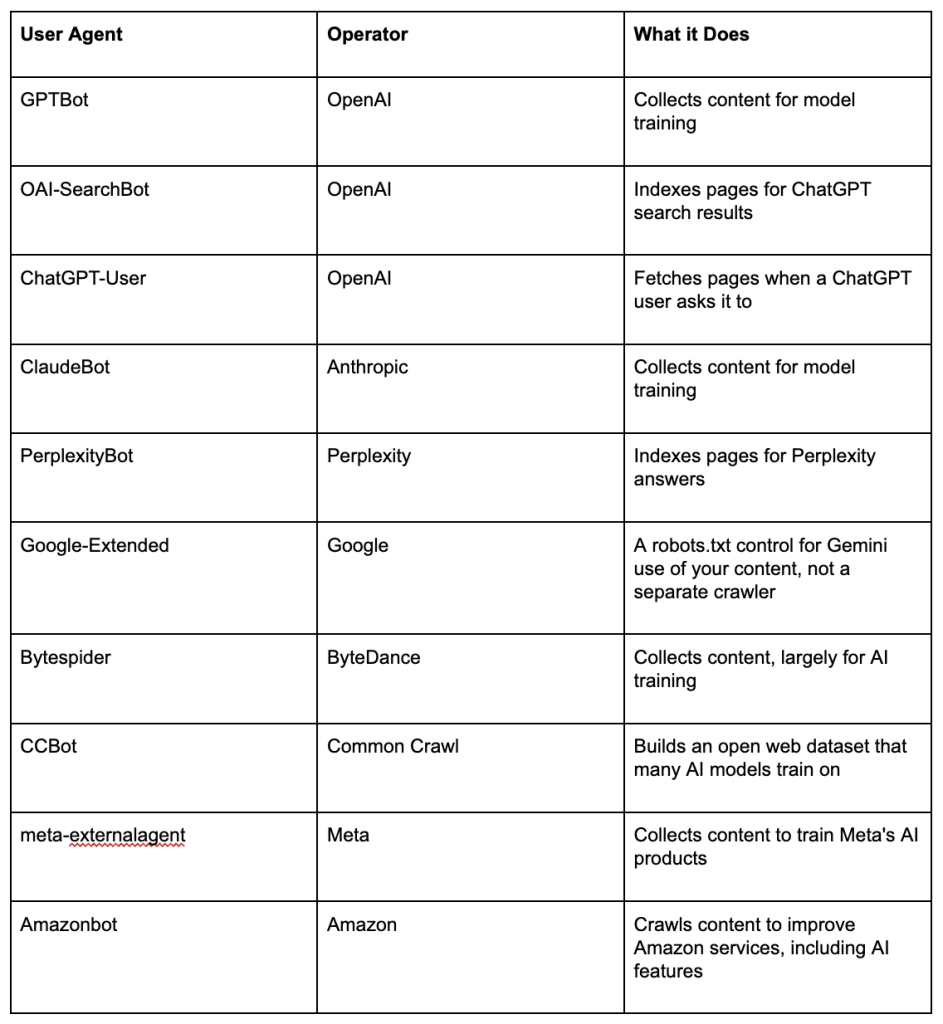
Common AI user agents to search for in your logs:
Running on WordPress? Many security and caching plugins log bot activity too. Our WordCamp US 2026 recap covers where WordPress hosting and AI tools are heading next.
A Sensible Allow-and-Block Starting Point
No single bot policy will fit every business. You have to decide what you value more: visibility in AI search or protection of your content.
Most businesses that depend on being found online lean toward visibility. The three groups below give you a place to start.
Allow: Bots That Can Send Traffic Back
These bots are the ones that send people your way. They power search results and live AI answers, so letting them in helps new visitors find you. Examples include OAI-SearchBot, ChatGPT-User, PerplexityBot, Googlebot, and Bingbot, plus facebookexternalhit, which builds link previews when people share your pages.
Review: The Genuinely Arguable Middle
GPTBot, ClaudeBot, and Google-Extended handle AI training. Block them, and your content stays out of future training data. The tradeoff is that future AI models might know less about your brand.
There’s no one right answer here. It comes down to how much your business counts on showing up in AI tools.
Block: Bots That Take Without Returning Much
Some crawlers eat up your server resources and give you little or nothing back. Plenty of publishers just shut them out.
The September 2026 robots.txt data shows what publishers actually chose. Bytespider, CCBot, meta-externalagent, and Amazonbot land on block lists most often. facebookexternalhit, OAI-SearchBot, and Bingbot get the green light most often.
A Sample robots.txt
Here’s an illustration you can adapt and implement. This example allows answering bots, blocks training crawlers, and blocks the most commonly blocked bots. Adjust the middle group to match your priorities.
# Answering and search bots: allow
User-agent: OAI-SearchBot
Allow: /
User-agent: ChatGPT-User
Allow: /
User-agent: PerplexityBot
Allow: /
# Training crawlers: your call (this example blocks them)
User-agent: GPTBot
Disallow: /
User-agent: ClaudeBot
Disallow: /
User-agent: Google-Extended
Disallow: /
# Most commonly blocked
User-agent: Bytespider
Disallow: /
User-agent: CCBot
Disallow: /
User-agent: meta-externalagent
Disallow: /
User-agent: Amazonbot
Disallow: /
One important caveat: robots.txt makes a request, not a rule. Well-behaved bots honor it, and others ignore it completely.
Real enforcement happens at the CDN or host level, through bot management, rate limiting, and firewall rules. If that sounds like more than you want to manage yourself, opt for a trusted hosting, maintenance, and security team to take it on.
The Basics Still Matter
Your bot policy only works if your security basics are in place. Cybersecurity Awareness Month is a reminder of four essentials every business should cover:
- Strong passwords, stored in a password manager
- Multifactor authentication on every account that offers it
- Prompt software, plugin, and system updates
- Recognizing and reporting phishing
AI-assisted attacks, including voice cloning, deepfakes, and QR-code phishing are becoming more prevalent. AI brings new risks along with new tools, as we noted in our look at the security risks of Google’s Gemini chatbot.
Go deeper on website security:
- Top 5 web security tips cover the quick wins most small business sites still miss.
- 8 tips to tactically avert cybersecurity threats gives you a practical checklist for reducing risk.
- Your guide to website security and higher SEO rankings explains why a secure site also ranks better.
- Digital Fortresses: your guide to online security takes a full podcast episode to dig into protecting your online presence.
Make a Deliberate Decision About AI Bots
Most site owners have never decided which AI bots to let in. That choice now shapes two things: your hosting costs and whether your business appears in AI answers.
You don’t need to block everything, and you don’t need to allow everything.
Sorting good bots from costly ones takes persistent attention. Bot names change, crawl patterns move, and robots.txt only goes so far.
Proof Digital’s hosting, maintenance, and security services include bot management, caching, CDN rules, and monitoring that keep your site fast, protected, and visible in AI search. Get in touch with our team, and we’ll help you build a bot policy that works for your business.
Frequently Asked Questions
How much of my website traffic comes from bots?
Cloudflare Radar data from June 2026 shows automated traffic accounts for 57.5% of HTML requests across the web. Your own share may run higher or lower, so check your server logs or your host’s bot analytics for site-specific numbers.
Should I block AI crawlers on my website?
Not all of them. Training crawlers mostly take content without sending visitors back, while answering bots can cite your pages and send referral traffic. Group bots instead of blocking every AI crawler.
Which AI bots should I allow?
Bots that power search results and live AI answers usually earn a place on your allow list. Common examples include OAI-SearchBot, ChatGPT-User, PerplexityBot, Googlebot, and Bingbot.
What’s the difference between GPTBot and OAI-SearchBot?
OpenAI uses GPTBot to collect content to train the model. OAI-SearchBot indexes pages for ChatGPT search, which can lead to citations and referral traffic. You can block one and allow the other in robots.txt.
Does blocking Google-Extended hurt my Google rankings?
Google states that Google-Extended controls how Gemini models use your content and does not affect your ranking in Google Search. Googlebot still handles regular search crawling.
Does robots.txt actually stop AI bots?
Robots.txt works as a request, not an enforcement tool. Well-behaved bots follow it, but others ignore it. True enforcement requires bot management at the CDN or hosting level.
How do I know if bots are raising my hosting costs?
To figure out if bots are raising your hosting costs, watch for slowdowns at odd hours, resource-limit warnings, or bandwidth that grows faster than your visitor count. If bots account for a third or more of your bandwidth, your plan likely costs more than your human audience requires.
Paul Miller is the IT Operations Specialist at Proof Digital. He keeps client websites fast, secure, and online, and he knows exactly which bots are knocking on the door.
Last Verified: October 2026