Meghan Lund is the Lead SEO/GEO Strategist at Proof Digital, an Indianapolis-based digital marketing agency. She specializes in helping brands measure and improve how AI search engines find, cite and recommend them.
TLDR: The best free tools for AI search monitoring are Google Search Console, Bing Webmaster Tools and Microsoft Clarity, all free, first-party platforms. Paired with a GA4 AI channel group and a monthly prompt test, they show AI impressions, citations, and AI-referred traffic without a subscription. Paid GEO platforms cost about $20 to $250 per month and make sense once manual testing takes more staff time than a subscription costs.
At a Glance:
- Monitoring and auditing solve different problems. Monitoring shows whether AI answers mention your brand, while auditing shows whether your pages are ready for AI engines to cite.
- Every free first-party tool has a blind spot. Search Console shows AI impressions but no clicks, Bing shows Copilot citations but no traffic, and Clarity shows AI-referred visits but misses AI features inside search engines.
- A monthly prompt test across ChatGPT, Gemini, Perplexity, Copilot and Claude offers the most reliable free way to track brand mentions, as long as you keep the conditions identical each run.
- Pages that answer one question completely, like blogs, tend to earn more AI visibility than service pages.
The best free AI search monitoring tools in 2026 are Google Search Console’s Generative AI performance reports, Bing Webmaster Tools’ AI Performance report, and Microsoft Clarity’s AI traffic channels.
All three come straight from the platforms, and all three cost nothing. Everything else worth using is either a one-off checker or a paid platform.
In this guide, we compare the top free tools, walk through what each one will and won’t tell you, share a free prompt-testing method, and take an honest look at what the paid options cost.
Looking for AI tools that help you do marketing work? Check out 6 free AI tools for marketing first.
What Does AI Search Monitoring Actually Mean? (And Why It Isn’t an AI SEO Audit)
Most AI search tool round-ups treat monitoring and auditing as the same thing. They’re not.
Monitoring tells you whether AI engines mention your brand, while auditing tells you whether your pages are ready for AI engines to cite.
Monitoring answers one question: is my brand appearing in AI answers, and is any traffic reaching me from them? It looks backward and measures outcomes. Search Console, Bing Webmaster Tools, Clarity, and manual prompt testing all live here.
Auditing answers a different question: is my page built so an AI system can read, understand, and cite it? It looks forward and measures readiness. Crawl checks, schema validators, and most AI SEO browser extensions live here.
Mix them up, and you might install a page-audit extension expecting brand tracking. It’ll tell you your headings look fine, but it won’t tell you whether ChatGPT mentioned your brand last Tuesday.
A few more quick definitions:
- Generative engine optimization (GEO) means shaping content so AI systems cite it.
- Answer engine optimization (AEO) pursues the same goal for answer-first surfaces like AI Overviews.
- A grounding query shows how an AI engine interpreted a request before it went looking for sources.
Our AI SEO & GEO glossary covers these terms in depth.
The takeaway: you need one tool from each category, and you can get both for free.
Free AI Search Monitoring Tools at a Glance
| Tool | What It Tracks | Cost | Biggest Limitation |
|---|---|---|---|
| Google Search Console (Generative AI reports) | AI Overviews and AI Mode impressions by page | Free | Impressions only; no queries or clicks |
| Bing Webmaster Tools (AI Performance) | Copilot citations, cited pages, grounding queries | Free | No click-through data |
| Microsoft Clarity (AI channels) | Visits and behavior from five AI platforms | Free | Misses AI features inside search engines |
| GA4 custom AI channel group | AI assistant referrals, separated from Referral | Free | Manual setup; misses referrer-less visits |
| Cloudflare AI Crawl Control | Which AI crawlers visit and how often | Free tier | Cloudflare sites only; crawling isn't citation |
| HubSpot AEO Grader | One-time brand visibility snapshot | Free | Snapshot, not a trend |
| Semrush free AI Visibility Tool | AI mentions, citations, cited pages, visibility score | Free, no account | Semrush picks the prompts; three checks daily |
| Ahrefs free AI visibility checker | No-signup brand check | Free | Snapshot with narrow scope |
| Manual prompt testing | Mentions, links and competitors across engines | Free | Takes staff time every month |
| Paid GEO platforms | Automated tracking, share of voice, sentiment | About $20 to $250/month | Most require a demo or trial |
Below, we dig into each tool so you can decide which ones belong in your stack.
What Are the Best Free AI Search Monitoring Tools in 2026?
The best free AI tools for search engine monitoring only help if you know their limits going in. Here’s what you’ll actually learn from each tool and, just as important, where they leave you guessing.
Google Search Console: Generative AI Performance Reports
Google Search Console gives you the closest thing to official AI visibility data, and it’s free for any verified site.
What it is: Google announced its Search generative AI performance reports on June 3, 2026 and rolled them out first to a subset of site owners. As of August 31, the reports are available to all sites worldwide. They live inside the Search Console property you already use.
What it shows you: Impressions from AI Overviews and AI Mode for your verified site. You can segment by page, country, device, and date, which lets you track AI Overview citations free at the page level.
What it costs: Nothing. You only need a verified property.
What it won’t tell you: The report shows impressions only. You get no queries, no clicks, no CTR, no average position, no citation placement, and no conversion data. It excludes Search Labs features, and Discover generative features report separately.
In classic search, an impression means Google showed your listing for someone to consider. In AI Overviews and AI Mode, the generated answer is the product, so an impression means Google chose your page as a source for that answer.
That makes this report more useful than it first appears. It shows you which pages Google already trusts enough to cite. Our site, proofdigital.com, earned 411 AI impressions in May 2026 and 5,650 in August, nearly 14 times as many, while we published almost nothing new.
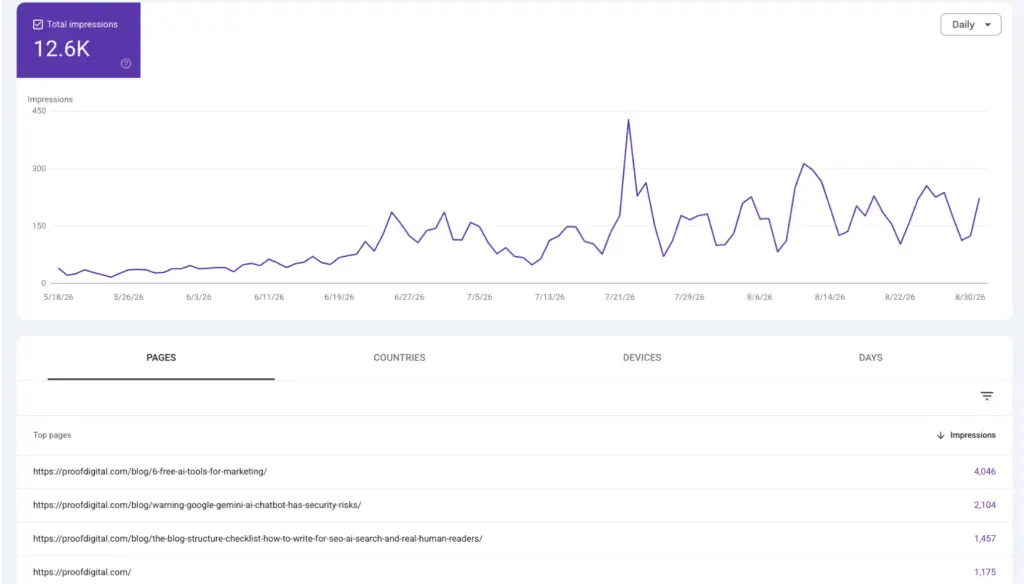
When we looked at which pages drove that growth, the top three were all practical guides or how-to posts. None were service pages. Google cited the content that fully answered a real question, not the pages that described what we sell.
For you, that means your report doubles as a content roadmap. Find the page types that earn AI impressions, then build more pages like them.
Bing Webmaster Tools: AI Performance Report
Bing Webmaster Tools offers the only free place to see Copilot citations directly.
What it is: A report inside Bing Webmaster Tools that tracks when Microsoft Copilot and partner AI platforms cite your site.
What it shows you: Citations by day, the pages that earned them, grounding queries, and a search-intent classification, with roughly three months of history. The most useful piece is the grounding query list.

Before Copilot searches for sources, it rewrites the user’s request into its own search query. The report shows you those rewritten queries, so you can see exactly which questions your cited pages answered in Copilot’s eyes.
What it costs: Free with site verification.
What it won’t tell you: The report has no click-through data. You learn that Copilot cited you, not whether anyone arrived at your site.
Don’t dismiss this as data for Bing users only. Bing’s index also supports other AI search experiences, so Copilot citation data gives you a wider read than Bing’s market share suggests.
Microsoft Clarity: AI Traffic Channels
Microsoft Clarity gives you the best free view of what AI-referred visitors do once they land on your site.
What it is: Clarity, Microsoft’s free behavior analytics tool, sorts AI traffic into two channel groups. AIPlatform covers organic links inside AI answers, and PaidAIPlatform covers paid placements inside AI chat. You’ll find both under Referrer › Channels.
What it shows you: Sessions from ChatGPT, Claude, Gemini, Copilot and Perplexity. You can measure AI session volume, compare AI visitors against other channels, attribute conversions, watch recordings and heatmaps, build segments, and export the data.
What it costs: Free.
What it won’t tell you: Clarity counts only direct visits from standalone AI platforms. It leaves out AI features built into search engines or productivity tools. It under-reports AI influence, so treat your numbers as a floor.
Every other free tool on this list stops at exposure. Clarity connects AI visibility to behavior and conversions. If your AI impressions climb but nobody converts, Clarity shows you where AI visitors drop off.
It also settles a question clients ask us constantly: does ChatGPT link to my site, and do those visitors do anything useful once they click?
Google Analytics 4: Build a Custom AI Channel Group
Without a custom channel group, AI referrals hide inside Referral and Direct, and nobody notices them.
What it is: A DIY channel grouping in GA4 that isolates traffic from AI assistant domains.
What it shows you: AI assistant sessions as their own line in your acquisition reports. To set it up:
- Go to Admin › Data display › Channel groups and create a new group.
- Add a channel called “AI assistants” with the condition Session source matches regex, using a pattern such as chatgpt\.com|perplexity\.ai|gemini\.google\.com|copilot\.microsoft\.com|claude\.ai.
- Drag the new channel above Referral so GA4 evaluates it first, then save.
What it costs: Free.
What it won’t tell you: You only capture visits that pass a referrer, so some assistant traffic will always land in Direct. GA4 also won’t give you recordings or heatmaps. Use it alongside Clarity, not instead of it.
Cloudflare AI Crawl Control: See Which AI Bots Actually Read Your Site
If AI crawlers can’t reach your pages, nothing downstream matters.
What it is: A Cloudflare feature for AI crawler traffic monitoring and control. It only works if your site runs on Cloudflare, so skip ahead if yours does not.
What it shows you: Which AI crawlers hit your site, how often they visit, and whether they respect your rules. You can also allow or block individual crawlers.
What it costs: Free on Cloudflare’s free plan, which includes the crawler activity table, robots.txt violation counts, and allow/block controls for each crawler. Paid plans add more thorough bot detection and custom block responses.
What it won’t tell you: Crawling isn’t citation. A bot visit proves the model can access your content, not that it uses or cites it. The free plan also detects only crawlers that identify themselves, so it may miss some AI traffic.
Pair Crawl Control with a robots.txt review for AI user agents. If your robots.txt blocks crawlers you actually want reading your site, fix that before you worry about citations.
These crawlers most likely use up part of your hosting resources. Learn all about which AI bots to keep, block, and review.
Free Checks and Snapshots Worth Running
These tools give you a one-time snapshot, not monitoring. They help you set a baseline or open a client conversation, but they can’t show you a trend. They shine when a client asks “do we show up in ChatGPT?” and you need an answer in the meeting.
HubSpot AEO Grader gives you a quick brand visibility read across ChatGPT, Perplexity and Gemini, with no account required. The catch: you get one moment in time, and you can’t compare runs cleanly.
Semrush’s free AI Visibility Tool gives you the richest snapshot on this list. Enter a domain, and it returns an AI Visibility Score, mentions, citations, top cited pages, and a competitor comparison across ChatGPT, Gemini, AI Mode, and AI Overviews. You don’t need an account.
The catch: you get three checks per day, and Semrush draws results from its own prompt database rather than prompts you choose. Prompt tracking, sentiment, and ongoing monitoring all sit in the paid AI Visibility Toolkit.
The Ahrefs free AI visibility checker runs a brand check without a signup. The catch: the scope stays narrow, and Ahrefs re-tiers its free tools regularly.
Use these free AEO tools for a first look. For anything you plan to report on month over month, move to the first-party stack above.
The Free Method Most Teams Skip: Structured Prompt Testing
The most reliable free monitoring method isn’t a tool at all. You ask the engines directly, the same way, every month. If you’ve wondered how to track brand mentions in ChatGPT without a subscription, this is the answer.
Here’s the five-step protocol we use.
- Build a prompt set. Write 15 to 25 prompts a real buyer would type. Mix four categories: problem prompts (“how do I…”), comparison prompts (“best X for Y”), local prompts (“best X in Indianapolis”), and branded prompts (“is [your brand] any good?”).
- Fix the conditions. Run the same prompts in the same order, logged out, with memory and personalization off, in a fresh session. Note the date and model version. AI answers drift between runs and accounts, and controls are important.
- Run across engines. Test ChatGPT, Gemini, Perplexity, Copilot, and Claude. Record whether each answer mentioned you, whether it linked to you, where you appeared, and who it cited instead.
- Log it in a sheet. Use one row per prompt per engine.
- Repeat monthly. One run tells you nothing. Six runs tell you whether your work is landing.
Your logging sheet needs these columns:
| Date | Engine | Prompt | Linked (Y/N) | Mentioned (Y/N) | Competitors Cited | Source URLs the Model Used |
The Source URLs column shows exactly which pages the model pulled from, yours or someone else’s.
What does good look like? Watch the trend across six runs, not the result of any single one. A rising mention rate on comparison prompts matters more than one lucky appearance on a branded prompt.
This method feeds your content plan too. The Competitors cited and Source URLs columns show which pages the engines trust for each question. Wondering how can monitoring AI mentions help shape my content briefs? This is it.
When a competitor’s page keeps winning a prompt, study what it answers that yours doesn’t. Then brief the gap.
What About the AI SEO Chrome Extensions Everyone is Sharing?
Most AI SEO extensions audit pages. They tell you whether a page looks readable to AI systems, not whether any engine cites your brand.
That still has value, but it answers a different question. Revisit the monitoring-versus-auditing split above before you install anything.
Then there’s security. In August 2026, researchers found 19 malicious extensions across Chrome and Edge that had gone undetected for roughly two years. They harvested browsing history, login details, and crypto wallet tokens.
Several targeted marketers directly, posing as traffic checkers, SEO analyzers, and ad-research tools. One extension in the same campaign reached around 70,000 installs before the stores pulled it.
A high install count, a Featured badge, or years of normal behavior don’t prove an extension is safe.
Before you install one, run through this checklist:
- Is there a native way to do this? Search Console, the Rich Results Test, or your browser’s developer tools handle many page checks with no extension at all.
- Does the developer have a real company site that matches the listing? A vague or missing site is a red flag.
- How many people use it, and when did the developer last update it? Low adoption plus long gaps between updates calls for caution.
- What permissions does it request, and does the job need them? A schema checker doesn’t need to read data on every site you visit.
- Re-audit your installed extensions regularly. Developers sell extensions, and a new owner can push a malicious update to a tool you’ve trusted for years.
None of this means you should avoid extensions entirely. It means you should treat each one like software with access to your accounts, because that’s exactly what it is.
What Can’t You Get for Free, and When Is Paying Worth It?
The dedicated AI visibility platforms all cost money. Entry prices currently run about $20 to $250 per month.
| Platform | Entry Price |
|---|---|
| Otterly.AI | $29/month |
| Peec AI | $95/month |
| Profound | $99/month + add-ons |
| Rankscale | $20/month |
| Scrunch | $250/month |
Paid platforms buy you continuous automated prompt tracking at volume, competitor share of voice, sentiment analysis, historical trends, and reports you can hand a client without rebuilding them every month.
Here’s a simple decision rule. If you check a handful of prompts for one brand, the free stack plus monthly prompt testing covers you. If AI search sits on a reporting line or you manage multiple brands, manual testing stops scaling once it costs more staff time than a subscription.
Buying friction matters too. Most paid GEO platforms put a demo or sales call between you and your data. If you want to start monitoring without a sales call or lengthy setup process, the free stack solves that: you can turn on every tool in it the same afternoon.
That matters most for nonprofits, advocacy groups and single-marketer teams. When small teams weigh free AI monitoring approaches vs paid platforms, the free stack plus a monthly prompt test usually covers what they need.
AI visibility monitoring and competitive intelligence are merging into one category, so our roundup of competitive intelligence tools helps if you’re comparing paid options. Prefer to hand the work off? Our generative engine optimization services cover monitoring and the fixes that follow.
How to Build a Free AI Monitoring Stack
You can set up the full stack in three days without buying anything.
Day 1: Verify your site in Search Console and Bing Webmaster Tools. Open both AI reports and record a baseline.
Day 2: Install Clarity and confirm the AIPlatform channel shows sessions. Then set up the GA4 AI channel group.
Day 3: Run your first prompt test across all five engines and log the results.
Ongoing: Re-run your prompt set monthly and review crawler access quarterly.
That’s the whole system, without a new line item in your budget.
Your data will usually point to one of three situations:
- Cited but no clicks: Your answer block and page structure need work, not your publishing volume. Start with our blog structure checklist, then become familiar with how to structure blog content for AI search, and how to be the best answer in AI search.
- Not cited at all: Check crawler access first, then review and implement the trust signals that work in 2026.
- Cited and getting clicks: Use Clarity to see what those visitors do next, and fix the pages where they drop off.
Start Measuring Before You Start Spending
Measurement in AI search costs nothing. The hard part is what you do with the data once you have it.
Set up the free stack this week and give it six months of monthly prompt tests.
When you’re ready to turn those numbers into citations, talk to Proof Digital’s generative engine optimization team. We can get you started with an SEO audit and live data dashboard.
Frequently Asked Questions
As a digital marketing specialist, what are the best free AI search monitoring tools?
The best free AI search monitoring tools are Google Search Console’s Generative AI performance reports, Bing Webmaster Tools’ AI Performance report, and Microsoft Clarity’s AI traffic channels. All three come directly from the platforms and cost nothing. Add a GA4 AI channel group and a monthly prompt test for a complete free stack.
What are the best free generative engine monitoring platforms?
Most dedicated generative engine monitoring platforms, including Otterly.AI, Peec AI, Profound, Rankscale, and Scrunch, charge a monthly fee. The best free generative engine monitoring platforms come from the search engines themselves. Google Search Console and Bing Webmaster Tools both report when AI answers surface or cite your pages, at no cost.
Can you track AI Mode rankings for free?
Partly. Google Search Console’s Generative AI performance reports show AI Mode and AI Overview impressions for free, segmented by page, country, device, and date. They don’t show queries, clicks, or positions. For position-style tracking, run the same prompts in AI Mode each month and log where your site appears.
How do I know if ChatGPT is citing my website?
Run a fixed set of buyer prompts in ChatGPT each month, logged out with memory off, and record whether each answer mentions or links to your site. Then check Microsoft Clarity’s AIPlatform channel for ChatGPT sessions. Those visits confirm that citations send you real traffic.
Does Google Search Console show AI Overview data?
Yes. Google Search generative AI performance reports show AI Overview and AI Mode impressions for your verified site. The reports show impressions only, with no queries, clicks, CTR or positions.
Is Microsoft Clarity free, and what does it show about AI traffic?
Yes, Clarity is free. It groups AI traffic into AIPlatform (organic links in AI answers) and PaidAIPlatform (paid placements in AI chat), covering ChatGPT, Claude, Gemini, Copilot, and Perplexity. You can see session behavior, recordings, heatmaps, and conversions. It doesn’t count AI features built into search engines.
Do I need a paid GEO tool?
Not at first. One brand checking a handful of prompts can rely on the free stack plus monthly manual testing. A paid GEO platform makes sense once you manage multiple brands, report AI visibility to clients, or spend more staff time on testing than a subscription costs.
Related Links
- How to Structure Blog Content for AI Search
- How to Be the Best Answer in AI Search
- AI in Digital Marketing
- How to Write AI Prompts for the Best Results
- AI Resources
- The Hidden Cost of AI: How Marketers Can Use It More Efficiently
- Small Business Marketing Meets AI: Trends, Tools, and Strategies
- AI and Digital Marketing: Helping Small Businesses Stay Competitive
- The Blog Structure Checklist: How to Write for SEO, AI Search, and Real Human Readers
- Inside Vistara 2026: AI Trends, Workflows, and Business Strategy
- How to Future-Proof Your Business with AI: A Practical Guide for SMB Leaders
- Our Work
- Let’s Talk